
Jeep Wrangler: SAFETY
- SAFETY FEATURES
- AUXILIARY DRIVING SYSTEMS
- Blind Spot Monitoring (BSM) — If Equipped
- Forward Collision Warning (FCW) With Mitigation — If Equipped
- Tire Pressure Monitoring System (TPMS)
- OCCUPANT RESTRAINT SYSTEMS
- Occupant Restraint Systems Features
- Important Safety Precautions
- Seat Belt Systems
- Supplemental Restraint Systems (SRS)
- Air Bag System Components
- If A Deployment Occurs
- Enhanced Accident Response System
- Maintaining Your Air Bag System
- Event Data Recorder (EDR)
- Child Restraints
- SAFETY TIPS
 TrailCam — If Equipped
Your vehicle may be equipped with a TrailCam
that allows you to see an on-screen image of the
front view of your vehicle. The image will be
displayed on the touchscreen along with a
caution note “Check Entire Surroundings”
across the top of the screen...

Other information:
Jeep Wrangler 2018-2026 Owners Manual: To Resume
If there is a set speed in the memory, push the RES button and then remove your foot from the accelerator pedal. The instrument cluster display will show the last set speed. Resume can be used at any speed above 20 mph (32 km/h) when only Fixed Speed Cruise Control is being used...
Jeep Wrangler 2018-2026 Owners Manual: Tire Pressures For High Speed Operation
FCA advocates driving at safe speeds and within posted speed limits. Where speed limits or conditions are such that the vehicle can be driven at high speeds, maintaining correct tire inflation pressure is very important. Increased tire pressure and reduced vehicle loading may be required for high-speed vehicle operation...
Categories
- Manuals Home
- Jeep Wrangler Owners Manual
- Jeep Wrangler Service Manual
- Jack Location
- Manual Seat Height Adjustment
- WARNING LIGHTS AND MESSAGES
- New on site
- Most important about car
To Unlock From The Driver or Passenger Side
With a valid Passive Entry key fob within 5 ft (1.5 m) of the door handle, grab the handle to unlock the vehicle. Grabbing the driver’s door handle will unlock the driver door automatically. Grabbing the passenger door handle will unlock all doors and the swing gate automatically.
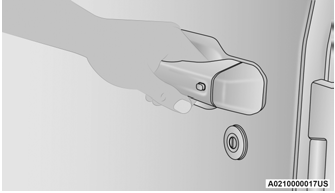
Grab The Door Handle To Unlock

Copyright © 2026 www.jewrangler.com