
Jeep Wrangler: OCCUPANT RESTRAINT SYSTEMS / Event Data Recorder (EDR)
This vehicle is equipped with an event data recorder (EDR). The main purpose of an EDR is to record, in certain crash or near crash-like situations, such as an air bag deployment or hitting a road obstacle, data that will assist in understanding how a vehicle’s systems performed. The EDR is designed to record data related to vehicle dynamics and safety systems for a short period of time, typically 30 seconds or less. The EDR in this vehicle is designed to record such data as:
- How various systems in your vehicle were operating;
- Whether or not the driver and passenger safety belts were buckled/fastened;
- How far (if at all) the driver was depressing the accelerator and/or brake pedal; and,
- How fast the vehicle was traveling.
These data can help provide a better understanding of the circumstances in which crashes and injuries occur.
NOTE:
EDR data are recorded by your vehicle only if a non-trivial crash situation occurs; no data are recorded by the EDR under normal driving conditions and no personal data (e.g., name, gender, age, and crash location) are recorded. However, other parties, such as law enforcement, could combine the EDR data with the type of personally identifying data routinely acquired during a crash investigation.
To read data recorded by an EDR, special equipment is required, and access to the vehicle or the EDR is needed. In addition to the vehicle manufacturer, other parties, such as law enforcement, that have the special equipment, can read the information if they have access to the vehicle or the EDR.
 Maintaining Your Air Bag System
WARNING!
Modifications to any part of the air bag
system could cause it to fail when you need
it. You could be injured if the air bag system
is not there to protect you...
 Child Restraints
Everyone in your vehicle needs to be buckled up
at all times, including babies and children. Every
state in the United States, and every Canadian
province, requires that small children ride in
proper restraint systems...
Other information:
Jeep Wrangler 2018-2026 Owners Manual: Cooling System Pressure Cap
The cap must be fully tightened to prevent loss of engine coolant (antifreeze), and to ensure that engine coolant will return to the radiator from the coolant expansion bottle/recovery tank if so equipped. The cap should be inspected and cleaned if there is any accumulation of foreign material on the sealing surfaces...
Jeep Wrangler 2018-2026 Owners Manual: Gear Ranges
Do not press the accelerator pedal when shifting out of PARK or NEUTRAL. NOTE: After selecting any gear range, wait a moment to allow the selected gear to engage before accelerating. This is especially important when the engine is cold. PARK (P) This range supplements the parking brake by locking the transmission...
Categories
- Manuals Home
- Jeep Wrangler Owners Manual
- Jeep Wrangler Service Manual
- Manual Seat Height Adjustment
- The ASSIST and SOS Call Buttons On Your Rearview Mirror Or Overhead Console
- SOS Call System Limitations
- New on site
- Most important about car
Manual Seat Height Adjustment
The driver's seat height can be raised or lowered by using the ratcheting handle, located on the outboard side of the seat. Pull upward on the handle to raise the seat, push downward on the handle to lower the seat. Several strokes may be necessary to achieve the desired position.
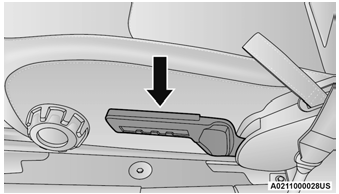
Seat Height Adjustment
