
Jeep Wrangler: MULTIMEDIA / OFF-ROAD PAGES — IF EQUIPPED
If your vehicle is equipped with Off-Road Pages, it will provide you vehicle status while operating on off-road conditions. It supplies information relating to the status of the drivetrain, transfer case, coolant/oil gauges, pitch and roll of the vehicle and access to the trailcam system.
To access Off-Road Pages, press the Apps button on the touchscreen, and then select “Off-Road Pages”.
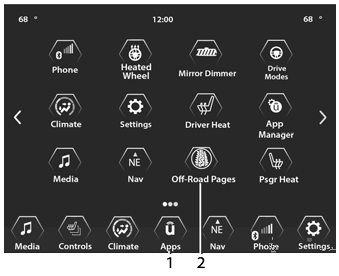
Main Menu
- Uconnect Apps Button
- Off-Road Pages App
 RADIO OPERATION AND MOBILE PHONES
Under certain conditions, the mobile phone
being on in your vehicle can cause erratic or
noisy performance from your radio. This
condition may be lessened or eliminated by
repositioning the mobile phone within the
vehicle...

Other information:
Jeep Wrangler 2018-2026 Owners Manual: STORING THE VEHICLE
WARNING! Take care to avoid the radiator cooling fan whenever the hood is raised. It can start anytime the ignition switch is ON. You can be injured by moving fan blades. Remove any metal jewelry such as rings, watch bands and bracelets that could make an inadvertent electrical contact...
Jeep Wrangler 2018-2026 Owners Manual: DOOR FRAME
WARNING! Do not drive your vehicle on public roads with the door frame(s) removed as you will lose the protection that they can provide. This procedure is furnished for use during off-road operation only. Do not drive your vehicle on public roads with the doors removed as you will lose the protection that they can provide...
Categories
- Manuals Home
- Jeep Wrangler Owners Manual
- Jeep Wrangler Service Manual
- Turning FCW On Or Off
- UCONNECT SETTINGS
- Engine Coolant Level — 2.0L
- New on site
- Most important about car
Automatic Headlights — If Equipped, Lights-On Reminder
Automatic Headlights
This system automatically turns the headlights on or off according to ambient light levels. To turn the system on, rotate the headlight switch clockwise to the last detent for automatic headlight operation. When the system is on, the headlight time delay feature is also on. This means the headlights will stay on for up to 90 seconds after you place the ignition into the OFF position. To turn the automatic system off, move the headlight switch out of the AUTO position.
