
Jeep Wrangler: OFF-ROAD PAGES — IF EQUIPPED / Pitch & Roll
The Pitch & Roll page displays the vehicle’s current pitch (angle up and down) and roll (angle side to side) in degrees. The pitch and roll gauges provide a visualization of the current vehicle angle.
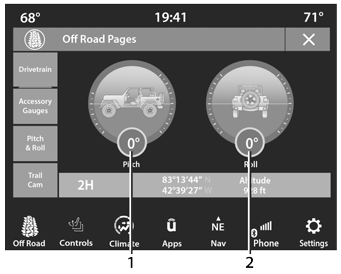
Pitch & Roll Menu 2WD/4WD
- Current Pitch
- Current Roll
 Accessory Gauge
The Accessory Gauge page displays the current
status of the vehicle’s Coolant Temperature, Oil Temperature, Oil Pressure (Gas
Vehicles Only),
Transmission Temperature, and Battery
Voltage...
 TrailCam — If Equipped
Your vehicle may be equipped with a TrailCam
that allows you to see an on-screen image of the
front view of your vehicle. The image will be
displayed on the touchscreen along with a
caution note “Check Entire Surroundings”
across the top of the screen...
Other information:
Jeep Wrangler 2018-2026 Owners Manual: Auxiliary Switches — If Equipped
Four auxiliary switches located in the lower switch bank of the instrument panel can be used to power various electrical devices. You have the ability to configure the functionality of the auxiliary switches via the Uconnect Settings. All switches can be configured as follows: Switch type operation: Latching or Momentary Power source: Battery or Ignition Ability to hold last state across key cycles: On or Off Auxiliary Switches NOTE: Holding last state conditions are met when switch type is set to latching and power source is set to ignition...
Jeep Wrangler 2018-2026 Owners Manual: Emergency Tow Hooks — If Equipped
If your vehicle is equipped with tow hooks, they are mounted in the front and the rear fascia/bumpers. Front Tow Hooks Rear Tow Hook NOTE: For off-road recovery, it is recommended to use both of the front tow hooks to minimize the risk of damage to the vehicle...
Categories
- Manuals Home
- Jeep Wrangler Owners Manual
- Jeep Wrangler Service Manual
- SiriusXM® Satellite Radio Mode — If Equipped
- How To Use Remote Start
- Draining Fuel/Water Separator Filter — Diesel Engine
- New on site
- Most important about car
Erasing All The HomeLink® Channels
To erase the channels, follow this procedure:
Place the ignition switch into the ON/RUN position. Push and hold the two outside HomeLink® buttons (I and III) for up to 20 seconds, or until the HomeLink® indicator light flashes.NOTE:
Erasing all channels should only be performed when programming HomeLink® for the first time. Do not erase channels when programming additional buttons.

Copyright © 2026 www.jewrangler.com