
Jeep Wrangler 2018-2026 Owners Manual / GETTING TO KNOW YOUR VEHICLE / WRANGLER TOPS / Hard Top Front Panel(s) Removal / Hard Top Panel(s) Storage Bag — If Equipped
Jeep Wrangler: Hard Top Front Panel(s) Removal / Hard Top Panel(s) Storage Bag — If Equipped
The Freedom Top panels storage bag allows you to store your hard top panels. The storage bag contains two compartments.
Lay the bag for the Freedom Top panels down so the loops and hooks are facing upward. Unzip the bag and fold back the outer flap.
NOTE:
Ensure the front panel latch is closed prior to inserting the panel into the panels bag.
- Insert the left side hard top panel into the bag with the latches facing upward.
- Unfold the black panel divider (ensure the divider is laying flat).
- Insert the right side Freedom Top panel into
the bag with the latches facing downward.
NOTE:
Ensure the front panel latch is closed prior to inserting the panel into the bag.
- Unfold the outer flap and zip the hard top
bag closed.
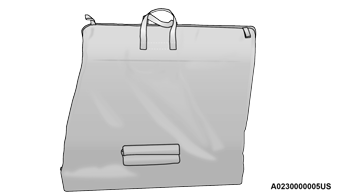
Step Four
- Lift the Freedom Top bag into the vehicle with the hooks and straps facing the back of the rear seat. Attach the clip at the bottom of the bag to the child restraint anchorage, located at the base of the rear seat.
- Wrap the upper strap around the rear head restraints and loop the strap through the buckle. Pull on the strap to tighten the Freedom Top bag securely against the rear seat.
 Hard Top Components
Four Door Hard Top Components
Right Side Panel
Left Side Panel
Hard Top
Two Door Hard Top Components
Right Side Panel
Left Side Panel
Hard Top
NOTE:
All hard top removal and installation instructions
are applicable to both two and four door
model vehicles...
 Hard Top Front Panel(s) Installation
Open the header latch inside the vehicle,
and the three L-shaped locks on each
panel.
Set the right side panel on the windshield
frame with the locating pin in the front
receiver mounting hole followed by the left
side panel, making sure there is no
overhang...
Other information:
Jeep Wrangler 2018-2026 Owners Manual: Turn Signal Indicator Lights
When the left or right turn signal is activated, the turn signal indicator will flash independently and the corresponding exterior turn signal lamps will flash. Turn signals can be activated when the multifunction lever is moved down (left) or up (right)...
Jeep Wrangler 2018-2026 Owners Manual: Tire Pressure Monitoring System (TPMS) Warning Light
The warning light switches on and a message is displayed to indicate that the tire pressure is lower than the recommended value and/or that slow pressure loss is occurring. In these cases, optimal tire duration and fuel consumption may not be guaranteed...
Categories
- Manuals Home
- Jeep Wrangler Owners Manual
- Jeep Wrangler Service Manual
- SiriusXM® Satellite Radio Mode — If Equipped
- WHEEL AND TIRE TORQUE SPECIFICATIONS
- How To Use Remote Start
- New on site
- Most important about car
Turn Signals. Lane Change Assist — If Equipped
Turn Signals
Move the multifunction lever up or down to activate the turn signals. The arrows on each side of the instrument cluster flash to show proper operation.
NOTE:
If either light remains on and does not flash, or there is a very fast flash rate, check for a defective outside light bulb.

Copyright © 2026 www.jewrangler.com