
Jeep Wrangler: Automatic Climate Control Descriptions And Functions / Blower Control
 Blower Control regulates the
amount
of air forced through the Climate
Control system. Adjusting the blower
will cause automatic mode to switch
to manual operation. There are seven blower
speeds available. The speeds can be selected
using either the blower control knob on the
faceplate or the buttons on the touchscreen.
Blower Control regulates the
amount
of air forced through the Climate
Control system. Adjusting the blower
will cause automatic mode to switch
to manual operation. There are seven blower
speeds available. The speeds can be selected
using either the blower control knob on the
faceplate or the buttons on the touchscreen.
- Faceplate: The blower speed increases as you turn the blower control knob clockwise from the lowest blower setting. The blower speed decreases as you turn the blower control knob counterclockwise.
- Touchscreen: Use the small blower icon to reduce the blower setting and the large blower icon to increase the blower setting. The blower can also be selected by pressing the blower bar area between the icons.
 SYNC Button
Press the SYNC button on the
touchscreen to toggle the SYNC
feature on/off. The SYNC indicator
illuminates when SYNC is on. SYNC
synchronizes the passenger temperature
setting with the driver temperature setting...
 Mode Control
Select one of the Mode buttons
on the
touchscreen or press the Mode
button on the faceplate to adjust the
airflow distribution. The airflow
distribution can be adjusted so air comes from
the instrument panel outlets, floor outlets,
defrost outlets, and demist outlets...
Other information:
Jeep Wrangler 2018-2026 Owners Manual: Maps
Push and hold the Voice Recognition (VR) button on the steering wheel until the beep or tap the Microphone icon to ask Google to take you to a desired destination by voice. You can also touch the Navigation icon in Android Auto™ to access other navigation apps...
Jeep Wrangler 2018-2026 Owners Manual: CNG And LP Fuel System Modifications. MMT In Gasoline
CNG And LP Fuel System Modifications Modifications that allow the engine to run on Compressed Natural Gas (CNG) or Liquid Propane (LP) may result in damage to the engine, emissions, and fuel system components. Problems that result from running CNG or LP are not the responsibility of the manufacturer and may void or not be covered under the New Vehicle Limited Warranty...
Categories
- Manuals Home
- Jeep Wrangler Owners Manual
- Jeep Wrangler Service Manual
- SiriusXM® Satellite Radio Mode — If Equipped
- How To Use Remote Start
- Jack Location
- New on site
- Most important about car
Manual Front Seat Forward/Rearward Adjustment
The seat can be adjusted forward or rearward by using a bar located by the front of the seat cushion, near the floor. While sitting in the seat, lift up on the bar located under the seat cushion and move the seat forward or rearward. Release the bar once you have reached the desired position. Then, using body pressure, move forward and rearward on the seat to be sure that the seat adjusters have latched.
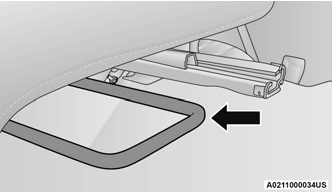
Adjustment Bar Location
