
Jeep Wrangler: FOUR–WHEEL DRIVE OPERATION / Axle Lock (Tru-Lok) Front And Rear — If Equipped
The AXLE LOCK switch is located on the instrument panel (to the right of the steering column).
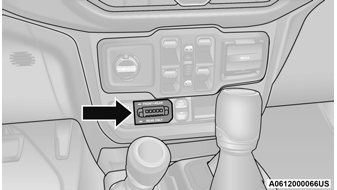
Axle Lock Switch Panel
This feature will only activate when the following conditions are met:
- Ignition in RUN position, vehicle in 4WD Low.
- Vehicle speed should be 10 mph (16 km/h) or less.
- Both right and left wheels on axle are at the same speed.
To activate the system, push the AXLE LOCK switch down to lock the rear axle only (the “REAR ONLY” will illuminate), push the switch up to lock the front axle and rear axle (the “FRONT + REAR” will illuminate). When the rear axle is locked, pushing the bottom of switch again will lock or unlock the front axle.
NOTE:
The indicator lights will flash until the axles are fully locked or unlocked.
To unlock the axles, push the AXLE LOCK OFF button.
Axle lock will disengage if the vehicle is taken out of 4WD Low, or the ignition switch is turned to the OFF position.
The axle lock disengages at speeds above 30 mph (48 km/h), and will automatically re-lock once vehicle speed is less than 10 mph (16 km/h).
 Trac-Lok Rear Axle — If Equipped
The Trac-Lok rear axle provides a constant
driving force to both rear wheels and reduces
wheel spin caused by the loss of traction at one
driving wheel...
 Axle Lock (Tru-Lok) Rear Only — If Equipped
The rear axle may be locked in 4WD High if the
proper conditions are met.
WARNING!
This mode is intended for off-highway or
off-road use only and should not be used on
any public roadways...
Other information:
Jeep Wrangler 2018-2026 Owners Manual: Android Auto™
Use this QR code to access your digital experience. Android Auto™ is a feature of your Uconnect system, and your Android™ 5.0 or higher powered smartphone with a data plan, that allows you to project your smartphone and a number of its apps onto the touchscreen radio display...
Jeep Wrangler 2018-2026 Owners Manual: Limited Use Spare — If Equipped
The limited use spare tire is for temporary emergency use only. This tire is identified by a label located on the limited use spare wheel. This label contains the driving limitations for this spare. This tire may look like the original equipped tire on the front or rear axle of your vehicle, but it is not...
Categories
- Manuals Home
- Jeep Wrangler Owners Manual
- Jeep Wrangler Service Manual
- Service 4WD Warning Light — If Equipped
- Turning FCW On Or Off
- SiriusXM® Satellite Radio Mode — If Equipped
- New on site
- Most important about car
To Unlock From The Driver or Passenger Side
With a valid Passive Entry key fob within 5 ft (1.5 m) of the door handle, grab the handle to unlock the vehicle. Grabbing the driver’s door handle will unlock the driver door automatically. Grabbing the passenger door handle will unlock all doors and the swing gate automatically.
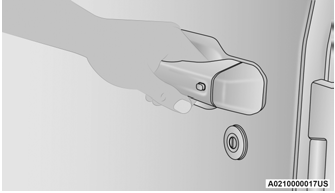
Grab The Door Handle To Unlock
