
Jeep Wrangler 2018-2026 Owners Manual / GETTING TO KNOW YOUR INSTRUMENT PANEL / WARNING LIGHTS AND MESSAGES / White Indicator Lights / Selec-Speed Control Indicator Light — If Equipped
Jeep Wrangler: White Indicator Lights / Selec-Speed Control Indicator Light — If Equipped
 This light will turn on when
“Selec-Speed Control” is activated.
This light will turn on when
“Selec-Speed Control” is activated.
To activate “Selec-Speed Control”, ensure the vehicle is in 4WD Low and push the button on the Instrument Panel.
NOTE:
If the vehicle is not in 4WD Low, “To Enter Selec-Speed Shift to 4WD Low” will appear in the instrument cluster display.
 Hill Descent Control (HDC) Indicator Light — If Equipped
This indicator shows when the
HDC
feature is turned on. The lamp will be
on solid when HDC is armed. HDC can
only be armed when the transfer case
is in the “4WD Low” position and the vehicle
speed is less then 30 mph (48 km/h)...

Other information:
Jeep Wrangler 2018-2026 Owners Manual: To Turn Off The Engine Using ENGINE START/STOP Button
Place the gear selector in PARK, then push and release the ENGINE START/STOP button. The ignition will return to the OFF mode. If the gear selector is not in PARK (with vehicle stopped) and the ENGINE START/ STOP button is pushed once, the transmission will automatically select PARK and the engine will turn off while the ignition will remain in the ACC mode (NOT the OFF mode)...
Jeep Wrangler 2018-2026 Owners Manual: PARKSENSE REAR PARK ASSIST — IF EQUIPPED
The ParkSense Rear Park Assist system provides visual and audible indications of the distance between the rear fascia/bumper and a detected obstacle when backing up (e.g. during a parking maneuver). For limitations of this system and recommendations...
Categories
- Manuals Home
- Jeep Wrangler Owners Manual
- Jeep Wrangler Service Manual
- Service 4WD Warning Light — If Equipped
- Engine Coolant Level — 2.0L
- Turning FCW On Or Off
- New on site
- Most important about car
To Unlock From The Driver or Passenger Side
With a valid Passive Entry key fob within 5 ft (1.5 m) of the door handle, grab the handle to unlock the vehicle. Grabbing the driver’s door handle will unlock the driver door automatically. Grabbing the passenger door handle will unlock all doors and the swing gate automatically.
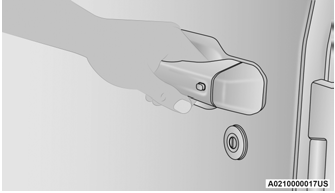
Grab The Door Handle To Unlock

Copyright © 2026 www.jewrangler.com