
Jeep Wrangler 2018-2026 Owners Manual / GETTING TO KNOW YOUR VEHICLE / DOORS / Keyless Enter-N-Go — Passive Entry (If Equipped)
Jeep Wrangler: DOORS / Keyless Enter-N-Go — Passive Entry (If Equipped)
The Passive Entry system is a feature that allows you to lock and unlock the vehicle’s door(s) and swing gate without having to push the key fob lock or unlock buttons.
NOTE:
- Passive Entry may be programmed on/off within the Uconnect Settings.
- The key fob may not be detected by the vehicle Passive Entry system if it is located next to a mobile phone, laptop, or other electronic device; these devices may interfere with the key fob’s wireless signal and prevent the Passive Entry system from locking/ unlocking the vehicle.
- Passive Entry Unlock initiates illuminated approach (low beams, license plate lamp, position lamps) for whichever time duration is set between 0, 30, 60 or 90 seconds. Passive Entry Unlock also initiates two flashes of the turn signal lamps.
- If wearing gloves, or if it has been raining/ snowing on the Passive Entry door handle, the unlock sensitivity can be affected, resulting in a slower response time.
- If the vehicle is unlocked by Passive Entry and no door is opened within 60 seconds, the vehicle will re-lock and if equipped will arm the Vehicle Security system.
- To Unlock From The Driver or Passenger Side
- Frequency Operated Button Integrated Key (FOBIK-Safe)
- To Lock The Vehicle’s Doors And Swing Gate
- To Unlock/Enter The Swing Gate
- To Lock The Swing Gate
 Power Door Locks — If Equipped
The power door lock switch is located on each
front door panel. Push the switch forward to
unlock the doors, and rearward to lock the
doors.
Power Door Lock Switch
WARNING!
For personal security reasons and safety in
a collision, lock the vehicle doors when you
drive, as well as when you park and exit the
vehicle...
 To Unlock From The Driver or Passenger Side
With a valid Passive Entry key fob within 5 ft
(1.5 m) of the door handle, grab the handle to
unlock the vehicle. Grabbing the driver’s door
handle will unlock the driver door automatically...
Other information:
Jeep Wrangler 2018-2026 Owners Manual: Amazon Alexa Skill — If Equipped
Enjoy the convenience of using your voice to command your vehicle with Amazon Alexa! With Amazon Alexa, you can connect to your vehicle and remotely access key services and features. If your vehicle is equipped with Uconnect Navigation, you can send a destination directly to your vehicle using Alexa...
Jeep Wrangler 2018-2026 Owners Manual: Preparations For Jump Start
Supplemental Battery — If Equipped WARNING! Only use the positive battery post on the main battery to jump start your vehicle. Serious injury or death could result if you attempt to jump start using the supplemental battery. Battery gas is flammable and explosive...
Categories
- Manuals Home
- Jeep Wrangler Owners Manual
- Jeep Wrangler Service Manual
- 2.0L Engine and 3.6L Engine
- Turning FCW On Or Off
- UCONNECT SETTINGS
- New on site
- Most important about car
Manual Front Seat Forward/Rearward Adjustment
The seat can be adjusted forward or rearward by using a bar located by the front of the seat cushion, near the floor. While sitting in the seat, lift up on the bar located under the seat cushion and move the seat forward or rearward. Release the bar once you have reached the desired position. Then, using body pressure, move forward and rearward on the seat to be sure that the seat adjusters have latched.
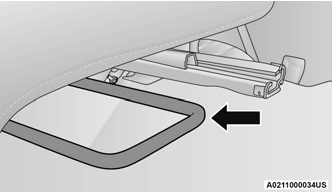
Adjustment Bar Location

Copyright © 2026 www.jewrangler.com