
Jeep Wrangler 2018-2026 Owners Manual / GETTING TO KNOW YOUR VEHICLE / DOORS / Keyless Enter-N-Go — Passive Entry (If Equipped) / To Unlock/Enter The Swing Gate
Jeep Wrangler: Keyless Enter-N-Go — Passive Entry (If Equipped) / To Unlock/Enter The Swing Gate
The swing gate Passive Entry unlock feature is built into the swing gate handle. With a valid Passive Entry key fob within 5 ft (1.5 m) of the swing gate handle, grab the swing gate handle to unlock the swing gate automatically, and pull the swing gate to open.
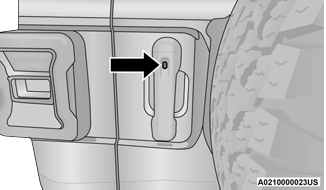
Swing Gate Passive Entry Lock Button
 To Lock The Vehicle’s Doors And Swing Gate
With one of the vehicle’s Passive Entry key fobs
within 5 ft (1.5 m) of the driver or passenger
front door handles, pushing the passive entry
lock button will lock the vehicle doors and the
swing gate...
 To Lock The Swing Gate
With a valid Passive Entry key fob within 5 ft
(1.5 m) of the swing gate handle, pushing the
Passive Entry lock button will lock the vehicle
doors and the swing gate...
Other information:
Jeep Wrangler 2018-2026 Owners Manual: Towing Tips
Before setting out on a trip, practice turning, stopping and backing the trailer in an area away from heavy traffic. If using a manual transmission vehicle for trailer towing, all starts must be in FIRST gear to avoid excessive clutch slippage. Automatic Transmission — If Equipped Select the DRIVE range when towing...
Jeep Wrangler 2018-2026 Owners Manual: How It Works
Use the Uconnect App to find the destination.There are multiple ways to find a destination. After selecting the “Location” tab at the bottom of the App, press the search box to browse through one of the categories provided, or type the name or keyword in the search box at the top of the App...
Categories
- Manuals Home
- Jeep Wrangler Owners Manual
- Jeep Wrangler Service Manual
- Service 4WD Warning Light — If Equipped
- How To Use Remote Start
- Auxiliary Switches — If Equipped
- New on site
- Most important about car
Basic Voice Commands
The basic Voice Commands below can be given at any point while using your Uconnect system. Push the VR button on the steering wheel. After the beep, say:
“Cancel” to stop a current voice session. “Help” to hear a list of suggested Voice Commands. “Repeat” to listen to the system prompts again.
Copyright © 2026 www.jewrangler.com