
Jeep Wrangler 2018-2026 Owners Manual / MULTIMEDIA / CONNECTED VEHICLE SERVICES — IF EQUIPPED / Using SiriusXM Guardian™ / Roadside Assistance Call
Jeep Wrangler: Using SiriusXM Guardian™ / Roadside Assistance Call
Description
Vehicles equipped with the SiriusXM Guardian™ system feature will contain an ASSIST button in the vehicle. Once your SiriusXM Guardian™ services have been activated, the ASSIST button can connect you directly to customer care call centers. You will be directed to one of the four services below:
- Roadside Assist — If you get a flat tire or need a tow, you’ll be connected to someone who can help anytime.
- Connected Services — Contact the SiriusXM Guardian™ Customer Care call center to activate your services, renew after your trial has expired, and for in-vehicle support for your SiriusXM Guardian™ system or help answering any general questions surrounding your connected services.
- Uconnect Care — In-vehicle support for all non-connected Uconnect system features, such as radio and Bluetooth® connections.
- Vehicle Care — Total support for your vehicle.
 Remote Horn & Lights
Description
It is easy to locate a vehicle in a dark, crowded
or noisy parking area by activating the horn and
lights. It may also help if you need to draw
attention to your vehicle for any reason...
 SiriusXM Guardian™ In-Vehicle Assistance Features
With SiriusXM Guardian™, your vehicle has
onboard assistance features located on the
rearview mirror or overhead console designed
to enhance your driving experience if you should
ever need assistance or support...
Other information:
Jeep Wrangler 2018-2026 Owners Manual: Lowering The Soft Top All The Way
Remove the rear window and quarter panel windows. From the Sunrider® position, remove straps if previously secured and move to the rear of the vehicle. Locate the Sunrider® latch beneath the #6 Bow of the soft top on the left side. Step Three Pull the latch to release the top, and allow the soft top to slide rearward freely in the guide tracks to the stowed position...
Jeep Wrangler 2018-2026 Owners Manual: Connected Services Account FAQs
How do I register for my SiriusXM Guardian™ account? There are three ways that you can register your SiriusXM Guardian™ Account: Push the ASSIST button. A call will be placed to an agent who can assist in registering your new account...
Categories
- Manuals Home
- Jeep Wrangler Owners Manual
- Jeep Wrangler Service Manual
- Manual Front Seat Recline Adjustment
- Manual Seat Height Adjustment
- UCONNECT SETTINGS
- New on site
- Most important about car
Manual Seat Height Adjustment
The driver's seat height can be raised or lowered by using the ratcheting handle, located on the outboard side of the seat. Pull upward on the handle to raise the seat, push downward on the handle to lower the seat. Several strokes may be necessary to achieve the desired position.
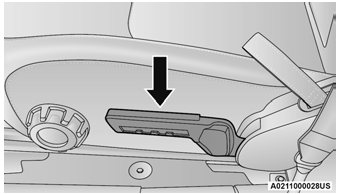
Seat Height Adjustment

Copyright © 2026 www.jewrangler.com