
Jeep Wrangler: Automatic Climate Control Descriptions And Functions / A/C Button
 Press and release this button on
the
touchscreen, or push the button on
the faceplate to change the current
setting. The A/C indicator illuminates
when A/C is on.
Press and release this button on
the
touchscreen, or push the button on
the faceplate to change the current
setting. The A/C indicator illuminates
when A/C is on.
The A/C button allows the operator to manually activate or deactivate the A/C system. When the A/C system is turned on, cool dehumidified air will flow through the outlets into the cabin.
 MAX A/C Button
Press and release the MAX A/C
button
on the touchscreen to change the
current setting to the coldest output
of air. The MAX A/C indicator
illuminates when MAX A/C is on...
 Recirculation Button
Press and release this button on
the
touchscreen, or push the button on
the faceplate, to change the system
between recirculation mode and
outside air mode...
Other information:
Jeep Wrangler 2018-2026 Owners Manual: UCONNECT SETTINGS
The Uconnect system uses a combination of buttons on the touchscreen and buttons on the faceplate located on the center of the instrument panel. These buttons allow you to access and change the Customer Programmable Features. Many features can vary by vehicle...
Jeep Wrangler 2018-2026 Owners Manual: Autostop Mode
WARNING! Vehicles with the Stop/Start system will be equipped with two batteries. Both the main and the supplemental batteries must be disconnected to completely de-energize the 12 Volt electrical system. Serious injury or death could result if you do not disconnect both batteries...
Categories
- Manuals Home
- Jeep Wrangler Owners Manual
- Jeep Wrangler Service Manual
- SERVICING AND MAINTENANCE
- SOS Call System Limitations
- Jack Location
- New on site
- Most important about car
To Unlock From The Driver or Passenger Side
With a valid Passive Entry key fob within 5 ft (1.5 m) of the door handle, grab the handle to unlock the vehicle. Grabbing the driver’s door handle will unlock the driver door automatically. Grabbing the passenger door handle will unlock all doors and the swing gate automatically.
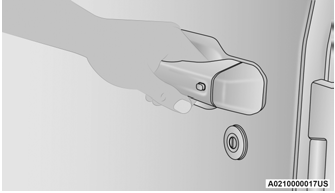
Grab The Door Handle To Unlock

Copyright © 2026 www.jewrangler.com