
Jeep Wrangler 2018-2026 Owners Manual / GETTING TO KNOW YOUR VEHICLE / WRANGLER TOPS / Removing The Soft Top
Jeep Wrangler: WRANGLER TOPS / Removing The Soft Top
Use this QR code to access your digital experience.
- Fully lower the soft top
CAUTION!
Failure to follow the next steps could result in damage to the Soft Top or vehicle.
- Make sure the lift assist mechanism on
both the left and right sides are in the “lock”
position, and an audible “click” is heard
when pushing down on the #1 bow from
each of the lift assist mechanisms before
removing.
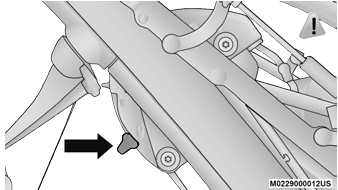
Step Two
- Using the provided #40 Torx head driver
and ratchet, unscrew the two Torx head
screws on each lift assist mechanism, then
lift the mechanism up and away from the
vehicle.
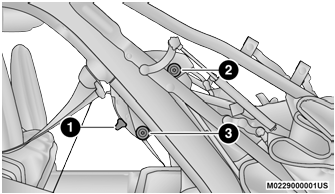
Step Three
-
Lock Position
-
Torx Head Screw
-
Torx Head Screw
-
- Pull the release lever on top of the rail
rearward to release the side link from the
track.
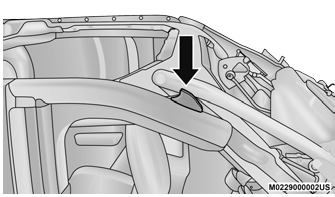
Step Four
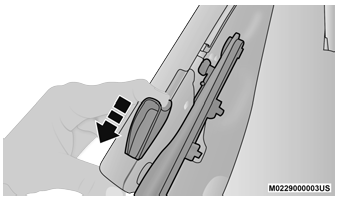
Step Four
- Repeat on the opposite side.
- Utilizing two people, lift the soft top up and
away from the vehicle, careful to avoid the
vehicle’s sport bar, trim, and tire carrier.
Store the soft top in a safe, clean, and dry
location.
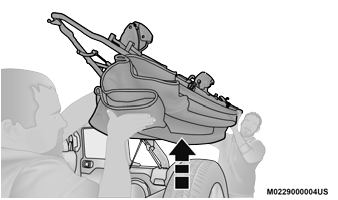
Step Six
- Using the provided #50 Torx head driver
and ratchet, unscrew the Torx screw on both
rear corners of the vehicle, removing the
retainers.
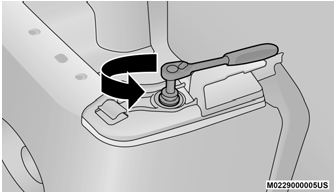
Step Seven
 Install The Rear Window
Guide the rear window into the retainer
from left to right while keeping the window
level.
Step One
Insert the swing gate bar into the retainers
at the bottom of the window from left to the
right...
 Installing The Soft Top
If currently installed, remove the hard top.
Install the door rails, starting with the front,
followed by the rear on each side. For
instructions and appropriate torque specifications
for the door rail Torx screws...
Other information:
Jeep Wrangler 2018-2026 Owners Manual: Maintenance-Free Battery
Your vehicle is equipped with a maintenance-free battery. You will never have to add water, and periodic maintenance is not required. WARNING! Battery fluid is a corrosive acid solution and can burn or even blind you. Do not allow battery fluid to contact your eyes, skin, or clothing...
Jeep Wrangler 2018-2026 Owners Manual: Accessory Drive Belt Inspection
WARNING! Do not attempt to inspect an accessory drive belt with vehicle running. When working near the radiator cooling fan, disconnect the fan motor lead. The fan is temperature controlled and can start at any time regardless of ignition mode...
Categories
- Manuals Home
- Jeep Wrangler Owners Manual
- Jeep Wrangler Service Manual
- WHEEL AND TIRE TORQUE SPECIFICATIONS
- Manual Seat Height Adjustment
- Turning FCW On Or Off
- New on site
- Most important about car
Manual Seat Height Adjustment
The driver's seat height can be raised or lowered by using the ratcheting handle, located on the outboard side of the seat. Pull upward on the handle to raise the seat, push downward on the handle to lower the seat. Several strokes may be necessary to achieve the desired position.
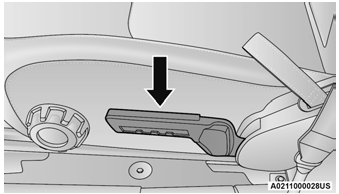
Seat Height Adjustment

Copyright © 2026 www.jewrangler.com