
Jeep Wrangler 2018-2026 Owners Manual / GETTING TO KNOW YOUR VEHICLE / WRANGLER TOPS / Power Sliding Top — If Equipped / Rear Quarter Window Removal
Jeep Wrangler: Power Sliding Top — If Equipped / Rear Quarter Window Removal
On vehicles equipped with a Power Sliding Top, the rear quarter windows can be removed. To remove these windows, follow the procedure below:
- Open the swing gate, and lift the rear window.
- Open both side doors nearest the quarter windows.
- Locate the rear quarter window latches (two on each window) on the interior of the windows.
- Rotate the left hand side latch clockwise to release.
- Rotate the right hand side latch counterclockwise
to release.
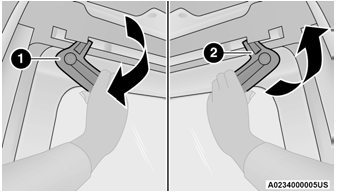
Step Five
- Rotate Left Handle Clockwise
- Rotate Right Handle Counterclockwise
- From the outside of the vehicle, lift each
window upward and away from the vehicle.
NOTE:
Do not pull down or apply any weight to the windows after the latches are released.
Damage could result to the pins holding the windows in place.
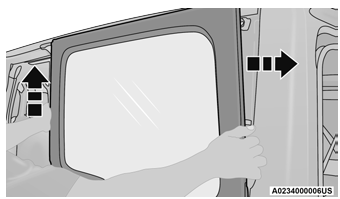
Step Six
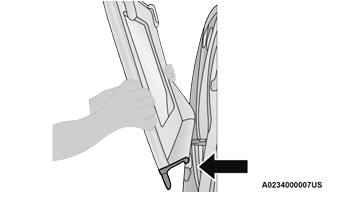
Step Six
- Store the rear quarter windows in the provided storage bag and keep in a safe location, or securely fasten the bag to the rear seat.
 Opening And Closing The Power Top
Express Open/Close
Push the open switch and release it within
one-half second and the power top will open
automatically from any position. The power top
will open fully and stop automatically...
 Quarter Window Storage Bag
To use the storage bags for the rear quarter
windows, proceed as follows:
With the bag completely open and the
fabric divider raised, place the first quarter
window with the latches facing outward
into the foam insert...
Other information:
Jeep Wrangler 2018-2026 Owners Manual: REPORTING SAFETY DEFECTS
In The 50 United States And Washington, D.C If you believe that your vehicle has a defect that could cause a crash or cause injury or death, you should immediately inform the National Highway Traffic Safety Administration (NHTSA) in addition to notifying FCA US LLC...
Jeep Wrangler 2018-2026 Owners Manual: Engine Coolant Level — 2.0L
WARNING! Do not open hot engine cooling system. Never add engine coolant (antifreeze) when the engine is overheated. Do not loosen or remove the cap to cool an overheated engine. Heat causes pressure to build up in the cooling system. To prevent scalding or injury, do not remove the pressure cap while the system is hot or under pressure...
Categories
- Manuals Home
- Jeep Wrangler Owners Manual
- Jeep Wrangler Service Manual
- SOS Call System Limitations
- SiriusXM® Satellite Radio Mode — If Equipped
- Display Warnings And Maintenance
- New on site
- Most important about car
Manual Seat Height Adjustment
The driver's seat height can be raised or lowered by using the ratcheting handle, located on the outboard side of the seat. Pull upward on the handle to raise the seat, push downward on the handle to lower the seat. Several strokes may be necessary to achieve the desired position.
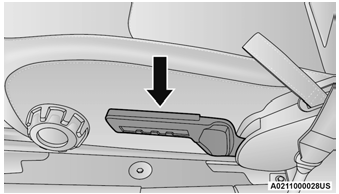
Seat Height Adjustment

Copyright © 2026 www.jewrangler.com