
Jeep Wrangler: INSTRUMENT CLUSTER DISPLAY / Instrument Cluster Display Location And Controls
The instrument cluster display is located in the center of the instrument cluster.
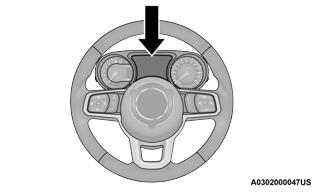
Instrument Cluster Display Location
The system allows the driver to select information by pushing the following buttons mounted on the steering wheel:
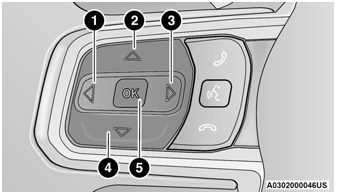
Instrument Cluster Display Control Buttons
- Left Arrow Button
- Up Arrow Button
- Right Arrow Button
- Down Arrow Button
- OK Button
Up  And Down
 Arrow Buttons:
Using the up  or down
 arrow button allows
you to cycle through the Main Menu Items.
arrow button allows
you to cycle through the Main Menu Items.
They also allow you to change the Main Screen area and Menu Title area.
Left  And Right
 Arrow Buttons:
Using the left
Arrow Buttons:
Using the left  or right
 arrow button allows
you to cycle through the submenu screens of
the Main menu item.
arrow button allows
you to cycle through the submenu screens of
the Main menu item.
OK Button
Push the OK button to access/select the information screens or submenu screens of a main menu item. To reset displayed/selected features push and hold the OK button for two seconds.
The Main Menu items consist of the following:
- Speedometer
- Vehicle Info
- Off Road — If Equipped
- Driver Assist — If Equipped
- Fuel Economy
- Trip Info
- Stop/Start — If Equipped
- Audio
- Messages
- Screen Setup
 INSTRUMENT CLUSTER DISPLAY
Your vehicle will be equipped with an
instrument cluster display, which offers useful
information to the driver. With the ignition in the
OFF mode, opening/closing of a door will
activate the display for viewing, and display the total miles, or kilometers, in
the odometer...
 Oil Change Reset — If Equipped
Your vehicle may be equipped with an engine oil
change indicator system. The “Oil Change
Required” message will display in the
instrument cluster display for five seconds after
a single chime has sounded to indicate the next
scheduled oil change interval...
Other information:
Jeep Wrangler 2018-2026 Owners Manual: To Turn Off The Engine Using ENGINE START/STOP Button
Place the gear selector in PARK, then push and release the ENGINE START/STOP button. The ignition will return to the OFF mode. If the gear selector is not in PARK (with vehicle stopped) and the ENGINE START/ STOP button is pushed once, the transmission will automatically select PARK and the engine will turn off while the ignition will remain in the ACC mode (NOT the OFF mode)...
Jeep Wrangler 2018-2026 Owners Manual: Electronic Roll Mitigation (ERM)
ERM anticipates the potential for wheel lift by monitoring the driver’s steering wheel input and the speed of the vehicle. When ERM determines that the rate of change of the steering wheel angle and vehicle’s speed are sufficient to potentially cause wheel lift, it then applies the appropriate brake and may also reduce engine power to lessen the chance that wheel lift will occur...
Categories
- Manuals Home
- Jeep Wrangler Owners Manual
- Jeep Wrangler Service Manual
- UCONNECT SETTINGS
- Auxiliary Switches — If Equipped
- Jack Location
- New on site
- Most important about car
Manual Seat Height Adjustment
The driver's seat height can be raised or lowered by using the ratcheting handle, located on the outboard side of the seat. Pull upward on the handle to raise the seat, push downward on the handle to lower the seat. Several strokes may be necessary to achieve the desired position.
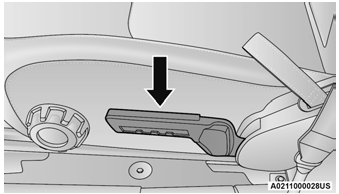
Seat Height Adjustment
