
Jeep Wrangler 2018-2026 Owners Manual / GETTING TO KNOW YOUR VEHICLE / WRANGLER TOPS / Raising The Soft Top / Installing The Soft Top Windows
Jeep Wrangler: Raising The Soft Top / Installing The Soft Top Windows
Install The Right And Left Quarter Windows
- From the rear of the vehicle, guide the top
of the window into the retainer and slide
forward while keeping the window level.
Repeat on the other side.
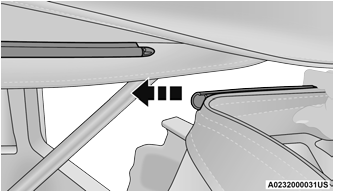
Step One
- Place the top of the quarter window pillar
into the top cover, and insert the bottom tab
into the clip.
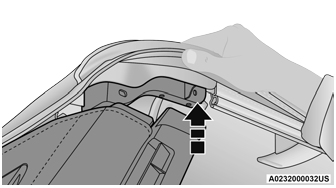
Step Two
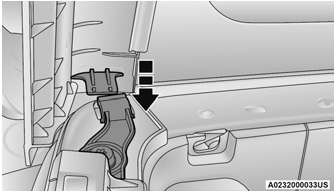
Step Two
CAUTION!
Failure to follow all Quarter Window Install steps could result in damage to the Soft Top or vehicle.
- Engage the retainers on the front of the
windows, ensuring they are fully engaged,
followed by the retainers along the bottom
of the windows.
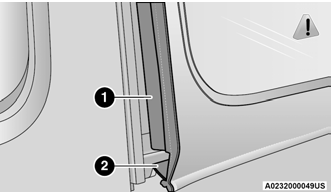
Step Three
-
Retainer At Front Of Quarter Window
-
Retainer At Bottom Of Quarter Window
NOTE:
It is critical that the retainers are fully engaged before the vehicle resumes motion.
-
- Secure the hook-and-loop fastener at the
upper front corner of each quarter window
by pressing firmly.
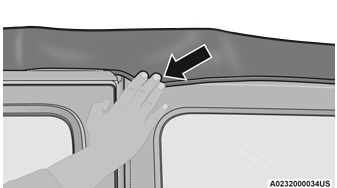
Step Four
 Raising The Soft Top From The Fully Lowered Position
From the fully lowered
position, remove straps if
previously secured.CAUTION!
Failure to follow the next steps could result in
damage to the Soft Top or vehicle...
 Install The Rear Window
Guide the rear window into the retainer
from left to right while keeping the window
level.
Step One
Insert the swing gate bar into the retainers
at the bottom of the window from left to the
right...
Other information:
Jeep Wrangler 2018-2026 Owners Manual: Summer Or Three Season Tires — If Equipped
Summer tires provide traction in both wet and dry conditions, and are not intended to be driven in snow or on ice. If your vehicle is equipped with Summer tires, be aware these tires are not designed for Winter or cold driving conditions. Install Winter tires on your vehicle when ambient temperatures are less than 40°F (5°C) or if roads are covered with ice or snow...
Jeep Wrangler 2018-2026 Owners Manual: Uconnect Market
With Uconnect Market, you can enjoy seamless and secure transactions from the comfort of your vehicle. Make restaurant reservations, place food orders, or pay for other goods and services right from the vehicle’s touchscreen. To get started with Uconnect Market on the touchscreen: Press the Market button in the Uconnect App drawer...
Categories
- Manuals Home
- Jeep Wrangler Owners Manual
- Jeep Wrangler Service Manual
- The ASSIST and SOS Call Buttons On Your Rearview Mirror Or Overhead Console
- Automatic High Beam Headlamp Control — If Equipped, Flash-To-Pass
- Draining Fuel/Water Separator Filter — Diesel Engine
- New on site
- Most important about car
Remote Start system
 This system uses the key fob to
start
the engine conveniently from outside
the vehicle while still maintaining
security. The system has a range of
approximately 300 ft (91 m).
This system uses the key fob to
start
the engine conveniently from outside
the vehicle while still maintaining
security. The system has a range of
approximately 300 ft (91 m).

Copyright © 2026 www.jewrangler.com