
Jeep Wrangler 2018-2026 Owners Manual / GETTING TO KNOW YOUR VEHICLE / EXTERIOR LIGHTS / Front Fog Lights — If Equipped
Jeep Wrangler: EXTERIOR LIGHTS / Front Fog Lights — If Equipped
To activate the Front Fog Lights, turn on the parking lights or low beam headlights and push the fog light switch. Pushing the fog light switch a second time will turn the front fog lights off.
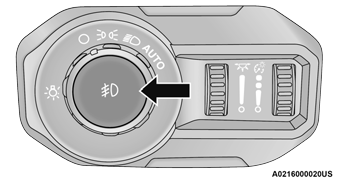
Front Fog Light Switch
 Automatic Headlights — If Equipped, Lights-On Reminder
Automatic Headlights
This system automatically turns the headlights
on or off according to ambient light levels. To
turn the system on, rotate the headlight switch
clockwise to the last detent for automatic
headlight operation...
 Turn Signals. Lane Change Assist — If Equipped
Turn Signals
Move the multifunction lever up or down to
activate the turn signals. The arrows on each
side of the instrument cluster flash to show
proper operation...
Other information:
Jeep Wrangler 2018-2026 Owners Manual: Oil Change Reset — If Equipped
Your vehicle may be equipped with an engine oil change indicator system. The “Oil Change Required” message will display in the instrument cluster display for five seconds after a single chime has sounded to indicate the next scheduled oil change interval...
Jeep Wrangler 2018-2026 Owners Manual: To Resume
If there is a set speed in the memory, push the RES button and then remove your foot from the accelerator pedal. The instrument cluster display will show the last set speed. Resume can be used at any speed above 20 mph (32 km/h) when only Fixed Speed Cruise Control is being used...
Categories
- Manuals Home
- Jeep Wrangler Owners Manual
- Jeep Wrangler Service Manual
- Manual Seat Height Adjustment
- Turning FCW On Or Off
- Engine Coolant Level — 2.0L
- New on site
- Most important about car
REMOTE START — IF EQUIPPED (DIESEL)

Copyright © 2026 www.jewrangler.com