
Jeep Wrangler 2018-2026 Owners Manual / STARTING AND OPERATING / DRIVING TIPS / Off-Road Driving Tips / Bumper End Cap Removal
Jeep Wrangler: Off-Road Driving Tips / Bumper End Cap Removal
The end caps on your vehicle’s front fascia/ bumper can be removed by following the steps below:
NOTE:
Bumper end caps are removable on steel fascia/bumper only.
-
Loosen the two bolts that retain the GAWR bracket (Bolts #1 and #2) to the end cap using a T45 torx bit screw driver. Do not remove the bolts.
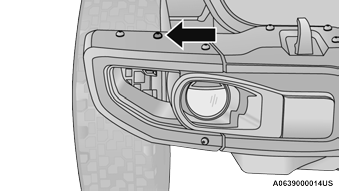
Bolt #1
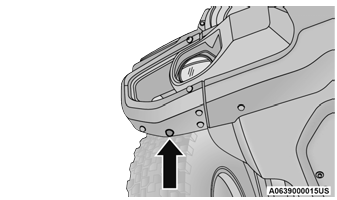
Bolt #2
-
Remove the remaining 8 bolts.
- Gently remove the end cap from the vehicle and store it where it will not get damaged.
- Repeat this procedure on the other side.
 Side Step Removal — If Equipped
NOTE:
Prior to off-road usage, the side steps should be
removed to prevent damage if so equipped.
Remove both nuts and bolt from the
underside of the vehicle for each bracke
Underside Nuts
Remove the side step assembly...
 The Basics Of Off-Road Driving
You will encounter many types of terrain driving
off-road. You should be familiar with the terrain
and area before proceeding. There are many
types of surface conditions: hard-packed dirt,
gravel, rocks, grass, sand, mud, snow and ice...
Other information:
Jeep Wrangler 2018-2026 Owners Manual: Snow Tires
Some areas of the country require the use of snow tires during the Winter. Snow tires can be identified by a “mountain/snowflake” symbol on the tire sidewall. If you need snow tires, select tires equivalent in size and type to the original equipment tires...
Jeep Wrangler 2018-2026 Owners Manual: Cooling System
WARNING! You or others can be badly burned by hot engine coolant (antifreeze) or steam from your radiator. If you see or hear steam coming from under the hood, do not open the hood until the radiator has had time to cool. Never open a cooling system pressure cap when the radiator or coolant bottle is hot...
Categories
- Manuals Home
- Jeep Wrangler Owners Manual
- Jeep Wrangler Service Manual
- SOS Call System Limitations
- Turning FCW On Or Off
- SiriusXM® Satellite Radio Mode — If Equipped
- New on site
- Most important about car
REMOTE START — IF EQUIPPED (DIESEL)

Copyright © 2026 www.jewrangler.com