
Jeep Wrangler 2018-2026 Owners Manual / MULTIMEDIA / CONNECTED VEHICLE SERVICES — IF EQUIPPED / Using SiriusXM Guardian™ / 4G Wi-Fi Hotspot — If Equipped
Jeep Wrangler: Using SiriusXM Guardian™ / 4G Wi-Fi Hotspot — If Equipped
Description
4G Wi-Fi Hotspot is an in-vehicle service that connects your device to an LTE (voice/data) or 4G (data) network that is ready to go wherever you are. After you've made your purchase, turn on your device’s Wi-Fi and connect your devices.
- Enables all your passengers to be simultaneously connected to the web.
- Connect several devices at one time.
- Any Wi-Fi-enabled device — such as a laptop or any other portable-enabled media — can connect over your private in-vehicle network.
- A high-speed, secured connection lets anyone on your private network access the Web — great for working and relaxing.
WARNING!
The driver should NEVER use the 4G Wi-Fi Hotspot while driving the vehicle as doing so may result in an accident involving serious injury or death.
 Vehicle Finder
Description
The Vehicle Finder feature of the Uconnect App
allows you to find the location of your stationary
vehicle.
You can also sound the horn and flash the lights
to make finding your vehicle even easier...
 Create A 4G Wi-Fi Hotspot For Use In Your Vehicle
How It Works
The 4G Wi-Fi Hotspot feature
provides
the vehicle passengers with an
internet access hotspot in the vehicle,
using the radio as an access point...
Other information:
Jeep Wrangler 2018-2026 Owners Manual: ONBOARD DIAGNOSTIC SYSTEM — OBD II
Your vehicle is equipped with a sophisticated Onboard Diagnostic system called OBD II. This system monitors the performance of the emissions, engine, and transmission control systems. When these systems are operating properly, your vehicle will provide excellent performance and fuel economy, as well as engine emissions well within current government regulations...
Jeep Wrangler 2018-2026 Owners Manual: JUMP STARTING
If your vehicle has a discharged battery, it can be jump started using a set of jumper cables and a battery in another vehicle, or by using a portable battery booster pack. Jump starting can be dangerous if done improperly, so please follow the procedures in this section carefully...
Categories
- Manuals Home
- Jeep Wrangler Owners Manual
- Jeep Wrangler Service Manual
- Display Warnings And Maintenance
- Service 4WD Warning Light — If Equipped
- SiriusXM® Satellite Radio Mode — If Equipped
- New on site
- Most important about car
To Unlock From The Driver or Passenger Side
With a valid Passive Entry key fob within 5 ft (1.5 m) of the door handle, grab the handle to unlock the vehicle. Grabbing the driver’s door handle will unlock the driver door automatically. Grabbing the passenger door handle will unlock all doors and the swing gate automatically.
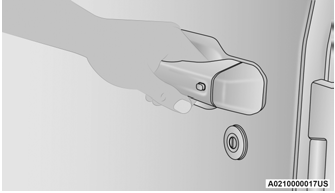
Grab The Door Handle To Unlock

Copyright © 2026 www.jewrangler.com