
Jeep Wrangler: Using SiriusXM Guardian™ / Send & Go
Description
The Send & Go feature of the Uconnect App allows you to search for a destination on your mobile device, and then send the route to your vehicle’s navigation system.
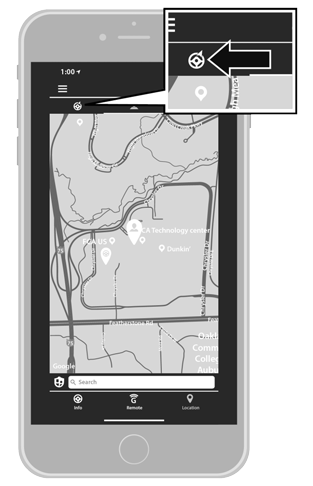
Send & Go
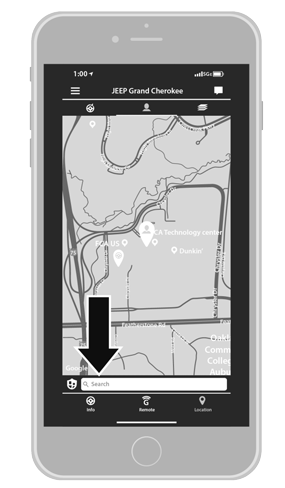
Send & Go Input
 SiriusXM Guardian™ In-Vehicle Assistance Features
With SiriusXM Guardian™, your vehicle has
onboard assistance features located on the
rearview mirror or overhead console designed
to enhance your driving experience if you should
ever need assistance or support...
 How It Works
Use the Uconnect App to find the
destination.There are multiple ways to find a destination.
After selecting the “Location” tab at
the bottom of the App, press the search box
to browse through one of the categories provided,
or type the name or keyword in the
search box at the top of the App...
Other information:
Jeep Wrangler 2018-2026 Owners Manual: Rollover Warning
Utility vehicles have a significantly higher rollover rate than other types of vehicles. This vehicle has a higher ground clearance and a higher center of gravity than many passenger vehicles. It is capable of performing better in a wide variety of off-road applications...
Jeep Wrangler 2018-2026 Owners Manual: Wait To Start Light — If Equipped
This indicator light will illuminate for approximately two seconds when the ignition is turned to the ON/RUN position. Its duration may be longer based on colder operating conditions. Vehicle will not initiate start until telltale is no longer displayed...
Categories
- Manuals Home
- Jeep Wrangler Owners Manual
- Jeep Wrangler Service Manual
- UCONNECT SETTINGS
- Auxiliary Switches — If Equipped
- Engine Coolant Level — 2.0L
- New on site
- Most important about car
Manual Front Seat Forward/Rearward Adjustment
The seat can be adjusted forward or rearward by using a bar located by the front of the seat cushion, near the floor. While sitting in the seat, lift up on the bar located under the seat cushion and move the seat forward or rearward. Release the bar once you have reached the desired position. Then, using body pressure, move forward and rearward on the seat to be sure that the seat adjusters have latched.
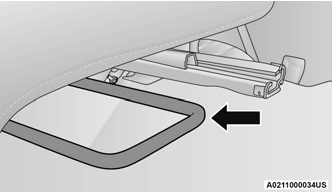
Adjustment Bar Location

Copyright © 2026 www.jewrangler.com