
Jeep Wrangler: WINDSHIELD WIPERS AND WASHERS / Rear Window Wiper/Washer — If Equipped
A rotary switch on the center portion of the windshield wiper/washer lever controls the operation of the rear wiper/washer function.
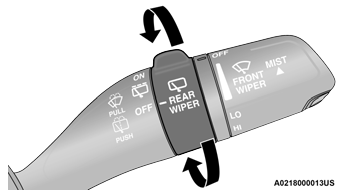
Rear Wiper/Washer Control
 Rotate the switch upward to the
first
detent position for intermittent
operation and to the second detent
for continuous rear wiper operation.
Rotate the switch upward to the
first
detent position for intermittent
operation and to the second detent
for continuous rear wiper operation.
 Push the wiper lever toward the
instrument panel to activate the rear
washer. The washer pump and wiper
will continue to operate as long as the
lever is held.
Push the wiper lever toward the
instrument panel to activate the rear
washer. The washer pump and wiper
will continue to operate as long as the
lever is held.
NOTE:
As a protective measure, the washer will stop if the switch is held for more than 20 seconds. Once the switch is released the washer will resume normal operation.
If the rear wiper is operating when the ignition is placed in the OFF position, the wiper will automatically return to the “park” position. When the vehicle is restarted, the wiper will resume function at whichever position the switch is set at.
 Mist
Mist
Push upward on the wiper lever to activate a
single wipe to clear off-road mist or spray from
a passing vehicle. As long as the lever is held
up, the wipers will continue to operate...
 CLIMATE CONTROLS
The Climate Control system allows you to
regulate the temperature, air flow, and direction
of air circulating throughout the vehicle. The
controls are located on the touchscreen (if
equipped) and on the instrument panel below
the radio...
Other information:
Jeep Wrangler 2018-2026 Owners Manual: MANUAL TRANSMISSION — IF EQUIPPED
WARNING! You or others could be injured if you leave the vehicle unattended without having the parking brake fully applied. The parking brake should always be applied when the driver is not in the vehicle, especially on an incline. CAUTION! Never drive with your foot resting on the clutch pedal, or attempt to hold the vehicle on a hill with the clutch pedal partially engaged, as this will cause abnormal wear on the clutch...
Jeep Wrangler 2018-2026 Owners Manual: Tire Repair
If your tire becomes damaged, it may be repaired if it meets the following criteria: The tire has not been driven on when flat. The damage is only on the tread section of your tire (sidewall damage is not repairable). The puncture is no greater than a ...
Categories
- Manuals Home
- Jeep Wrangler Owners Manual
- Jeep Wrangler Service Manual
- Service 4WD Warning Light — If Equipped
- WARNING LIGHTS AND MESSAGES
- SERVICING AND MAINTENANCE
- New on site
- Most important about car
REMOTE START — IF EQUIPPED (DIESEL)
