
Jeep Wrangler: REAR SWING GATE / Opening the swing gate
The rear swing gate can be unlocked by using one of the following methods:
- Mechanical key (with mechanical lock — if equipped)
- Remote Keyless Entry key fob (if equipped)
- Power door unlock switch on the front doors (if equipped)
- Passive Entry swing gate handle (if equipped)
To open the swing gate, pull on the handle.
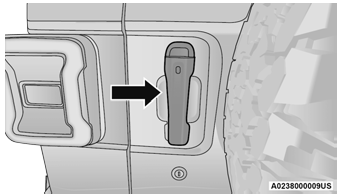
Swing Gate Handle
NOTE:
Close the rear flip-up window before attempting to close the swing gate (hard top models only).
WARNING!
Driving with the flip-up window open can allow poisonous exhaust gases into your vehicle. You and your passengers could be injured by these fumes. Keep the flip-up window closed when you are operating the vehicle.
CAUTION!
Do not push on rear wiper blade when closing the rear flip-up window, as damage to the blade will result.
NOTE:
The swing gate hinges and check strap may require cleaning if a squeak can be heard when opening the swing gate. Progressive accumulation of dirt or debris on the check strap arm may cause failure of the check strap, requiring replacement. For further information on vehicle cleaning procedures.

 Cargo Area Features
Trail Rail Cargo Organizer — If Equipped
If your vehicle is equipped with the Trail Rail
system, a rail will be found built into the floor on
either side of the cargo area...
Other information:
Jeep Wrangler 2018-2026 Owners Manual: Child-Protection Door Lock System — Rear Doors
To provide a safer environment for small children riding in the rear seats, the rear doors are equipped with a Child-Protection Door Lock system. To use the system, open each rear door, use a flat blade screwdriver (or mechanical key) and rotate the dial to the lock or unlock position...
Jeep Wrangler 2018-2026 Owners Manual: Android Auto™ Voice Command
NOTE: Feature availability depends on your carrier and mobile phone manufacturer. Some Android Auto™ features may or may not be available in every region and/or language. Android Auto™ allows you to use your voice to interact with Android’s™ best-in-class speech technology through your vehicle’s voice recognition system, and use your smartphone’s data plan to project your Android™-powered smartphone and a number of its apps onto your Uconnect touchscreen...
Categories
- Manuals Home
- Jeep Wrangler Owners Manual
- Jeep Wrangler Service Manual
- UCONNECT SETTINGS
- Auxiliary Switches — If Equipped
- SOS Call System Limitations
- New on site
- Most important about car
Erasing All The HomeLink® Channels
To erase the channels, follow this procedure:
Place the ignition switch into the ON/RUN position. Push and hold the two outside HomeLink® buttons (I and III) for up to 20 seconds, or until the HomeLink® indicator light flashes.NOTE:
Erasing all channels should only be performed when programming HomeLink® for the first time. Do not erase channels when programming additional buttons.
