
Jeep Wrangler: REFUELING THE VEHICLE — GASOLINE ENGINE (IF EQUIPPED) / Fuel Filler Cap
The fuel filler cap is located on the driver's side of the vehicle. If the fuel filler cap is lost or damaged, be sure the replacement cap is the correct one for this vehicle.
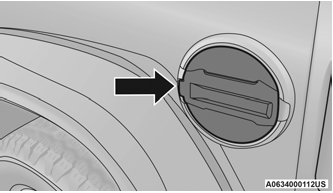
Fuel Filler Door
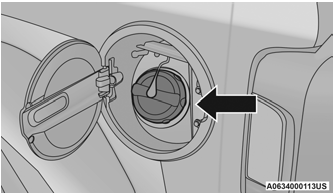
Fuel Filler Cap
WARNING!
- Never have any smoking materials lit in or near the vehicle when the fuel door is open or the tank is being filled.
- Never add fuel when the engine is running. This is in violation of most state and federal fire regulations and may cause the “Malfunction Indicator Light” to turn on.
- A fire may result if fuel is pumped into a portable container that is inside of a vehicle. You could be burned. Always place fuel containers on the ground while filling.
CAUTION!
- Damage to the fuel system or emission control system could result from using an improper fuel filler cap. A poorly fitting cap could let impurities into the fuel system. Also, a poorly fitting aftermarket cap can cause the “Malfunction Indicator Light (MIL)” to illuminate, due to fuel vapors escaping from the system.
- To avoid fuel spillage and overfilling, do not “top off” the fuel tank after filling.
NOTE:
- When the fuel nozzle “clicks” or shuts off, the fuel tank is full.
- Tighten the fuel filler cap about a quarter turn until you hear one click. This is an indication that the cap is properly tightened.
- If the fuel filler cap is not tightened properly, the MIL will come on. Be sure the cap is tightened every time the vehicle is refueled.

 Loose Fuel Filler Cap Message
After fuel has been added, the vehicle
diagnostic system can determine if the fuel filler
cap is possibly loose, improperly installed, or
damaged. If the system detects a malfunction,
the “gASCAP” message will display in the
odometer display...
Other information:
Jeep Wrangler 2018-2026 Owners Manual: SiriusXM Guardian™ Contact Information And Business Hours
SiriusXM Guardian™/Care US residents visit: https://www.driveuconnect. com/sirius-xm-guardian.html or call 1-844-796-4827 Canadian residents visit: https://www.driveuconnect. ca/en/sirius-xm-guardian or call 1-877-324-9091 Uconnect Phone Customer Support UconnectPhone...
Jeep Wrangler 2018-2026 Owners Manual: Create A 4G Wi-Fi Hotspot For Use In Your Vehicle
How It Works The 4G Wi-Fi Hotspot feature provides the vehicle passengers with an internet access hotspot in the vehicle, using the radio as an access point. The hotspot will allow Wi-Fi-enabled in-vehicle devices (such as a laptop or any other portable-enabled media device) to wirelessly connect to the internet...
Categories
- Manuals Home
- Jeep Wrangler Owners Manual
- Jeep Wrangler Service Manual
- UCONNECT SETTINGS
- SERVICING AND MAINTENANCE
- Automatic High Beam Headlamp Control — If Equipped, Flash-To-Pass
- New on site
- Most important about car
Manual Front Seat Forward/Rearward Adjustment
The seat can be adjusted forward or rearward by using a bar located by the front of the seat cushion, near the floor. While sitting in the seat, lift up on the bar located under the seat cushion and move the seat forward or rearward. Release the bar once you have reached the desired position. Then, using body pressure, move forward and rearward on the seat to be sure that the seat adjusters have latched.
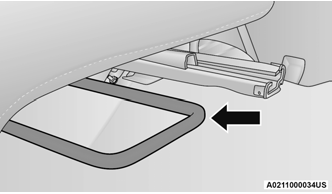
Adjustment Bar Location

Copyright © 2026 www.jewrangler.com