
Jeep Wrangler 2018-2026 Owners Manual / MULTIMEDIA / UCONNECT SYSTEMS
Jeep Wrangler: MULTIMEDIA / UCONNECT SYSTEMS
For detailed information about your Uconnect 4/4C/4C NAV With 8.4-inch Display system, refer to your Uconnect Owner’s Manual Supplement.
NOTE:
Uconnect screen images are for illustration purposes only and may not reflect exact software for your vehicle.
 MULTIMEDIA
..
 CYBERSECURITY
Your vehicle may be a connected vehicle and
may be equipped with both wired and wireless
networks. These networks allow your vehicle to
send and receive information...
Other information:
Jeep Wrangler 2018-2026 Owners Manual: Rear Carpet (Four Door Models)
Remove the grommets under the front seat (one left and one right). Then pull the carpet out, to the rear and open the carpet split around the front seats brackets. Pull Toward The Rear Of Vehicle Carpet Split Remove the grommets under the rear seat (one left and one right)...
Jeep Wrangler 2018-2026 Owners Manual: Power Sliding Top — If Equipped
CAUTION! Lowering of the windshield is NOT recommended in vehicles equipped with a Power Sliding Top. Damage will occur to the top as well as the header seal. If your vehicle is equipped with a Power Sliding Top, the control switch can be found on the front trim panel, to the right of the driver’s side sun visor...
Categories
- Manuals Home
- Jeep Wrangler Owners Manual
- Jeep Wrangler Service Manual
- WARNING LIGHTS AND MESSAGES
- 2.0L Engine and 3.6L Engine
- WHEEL AND TIRE TORQUE SPECIFICATIONS
- New on site
- Most important about car
Manual Seat Height Adjustment
The driver's seat height can be raised or lowered by using the ratcheting handle, located on the outboard side of the seat. Pull upward on the handle to raise the seat, push downward on the handle to lower the seat. Several strokes may be necessary to achieve the desired position.
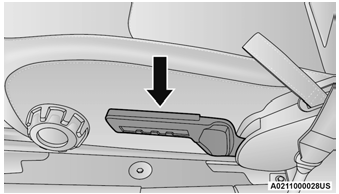
Seat Height Adjustment

Copyright © 2026 www.jewrangler.com