
Jeep Wrangler: Adaptive Cruise Control (ACC) — If Equipped / To Set A Desired Speed
When the vehicle reaches the speed desired, push the SET (+) button or the SET (-) button and release. The instrument cluster display will show the set speed.
NOTE:
Fixed Speed Cruise Control can be used without an ACC distance set. To change between the different modes, push the ACC on/off button which turns the ACC and the Fixed Speed Cruise Control off. Pushing the Fixed Speed Cruise Control on/off button will result in turning on (changing to) Fixed Speed Cruise Control mode.
WARNING!
In the Fixed Speed Cruise Control mode, the system will not react to vehicles ahead. In addition, the proximity warning does not activate and no alarm will sound even if you are too close to the vehicle ahead since neither the presence of the vehicle ahead nor the vehicle-to-vehicle distance is detected. Be sure to maintain a safe distance between your vehicle and the vehicle ahead. Always be aware which mode is selected.
If ACC is set when the vehicle speed is below 20 mph (32 km/h), the set speed will default to 20 mph (20 km/h).
NOTE:
Fixed Speed Cruise Control cannot be set below 20 mph (32 km/h).
If either system is set when the vehicle speed is above 20 mph (32 km/h), the set speed shall be the current speed of the vehicle.
On vehicles equipped with a manual transmission, the ACC system cannot be set when the vehicle speed is below 20 mph (32 km/h) or when the vehicle is in FIRST gear.
NOTE:
- Keeping your foot on the accelerator pedal can cause the vehicle to continue to accelerate beyond the set speed. If this occurs, the message “DRIVER OVERRIDE” will display in the instrument cluster display.
- If you continue to accelerate beyond the set speed while an ACC distance is also set, the system will not be controlling the distance between your vehicle and the vehicle ahead. The vehicle speed will only be determined by the position of the accelerator pedal.
 To Activate/Deactivate
Push and release the Adaptive Cruise Control
(ACC) on/off button. The ACC menu in the
instrument cluster display will read “ACC
Ready.”
To turn the system off, push and release the
Adaptive Cruise Control (ACC) on/off button
again...
 To Cancel
T..
Other information:
Jeep Wrangler 2018-2026 Owners Manual: Water In Fuel Indicator Light — If Equipped
The “Water In Fuel Indicator Light” will illuminate when there is water detected in the fuel filter. If this light remains on, DO NOT start the vehicle before you drain the water from the fuel filter to prevent engine damage, and please see an authorized dealer...
Jeep Wrangler 2018-2026 Owners Manual: Remote Start Comfort Systems — If Equipped
When Remote Start is activated, the front and rear defrost will automatically turn on in cold weather. The heated steering wheel and driver heated seat feature will turn on if programmed in the comfort menu screen within Uconnect Settings. In warm weather, the driver vented seat feature will automatically turn on when the Remote Start is activated, if programmed in the comfort menu screen...
Categories
- Manuals Home
- Jeep Wrangler Owners Manual
- Jeep Wrangler Service Manual
- Automatic High Beam Headlamp Control — If Equipped, Flash-To-Pass
- Manual Seat Height Adjustment
- How To Use Remote Start
- New on site
- Most important about car
Manual Seat Height Adjustment
The driver's seat height can be raised or lowered by using the ratcheting handle, located on the outboard side of the seat. Pull upward on the handle to raise the seat, push downward on the handle to lower the seat. Several strokes may be necessary to achieve the desired position.
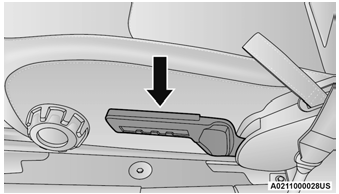
Seat Height Adjustment
